

Skip to content

Service · Web design

Online store design

A store that’s easy for your customers to use and fits the way your business works.

We’ll start with what you sell and how you handle orders. Then I’ll build a store where customers can easily find a product, see what they’re getting, and place an order, on mobile too.

Elad Oren

I’m Elad Oren. I plan, design, and build online stores for physical and digital products.

  • Catalog, product pages, and checkout
  • A store you can manage yourself
  • A foundation for organic search

Work

Online stores and sales sites
I’ve built.

Two projects, two ways to sell: a catalog with pickup orders and a digital course. In each one, the build started with the product and the way the business handles orders.

Catalog and pickup orders

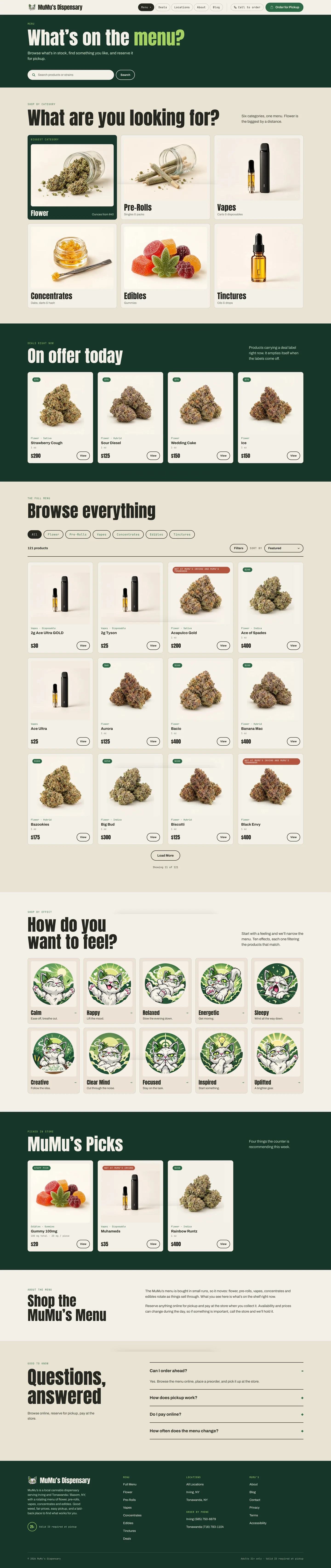
MuMu’s Dispensary

The shop of a local brand in New York State

A product catalog organized by category, with search and filters that help customers find the right product. They place a pickup order on the site, then pay and pick up in store.

Good fit for: businesses with a large catalog, where customers need an easy way to narrow down their options.

View the MuMu’s Dispensary project
Digital course

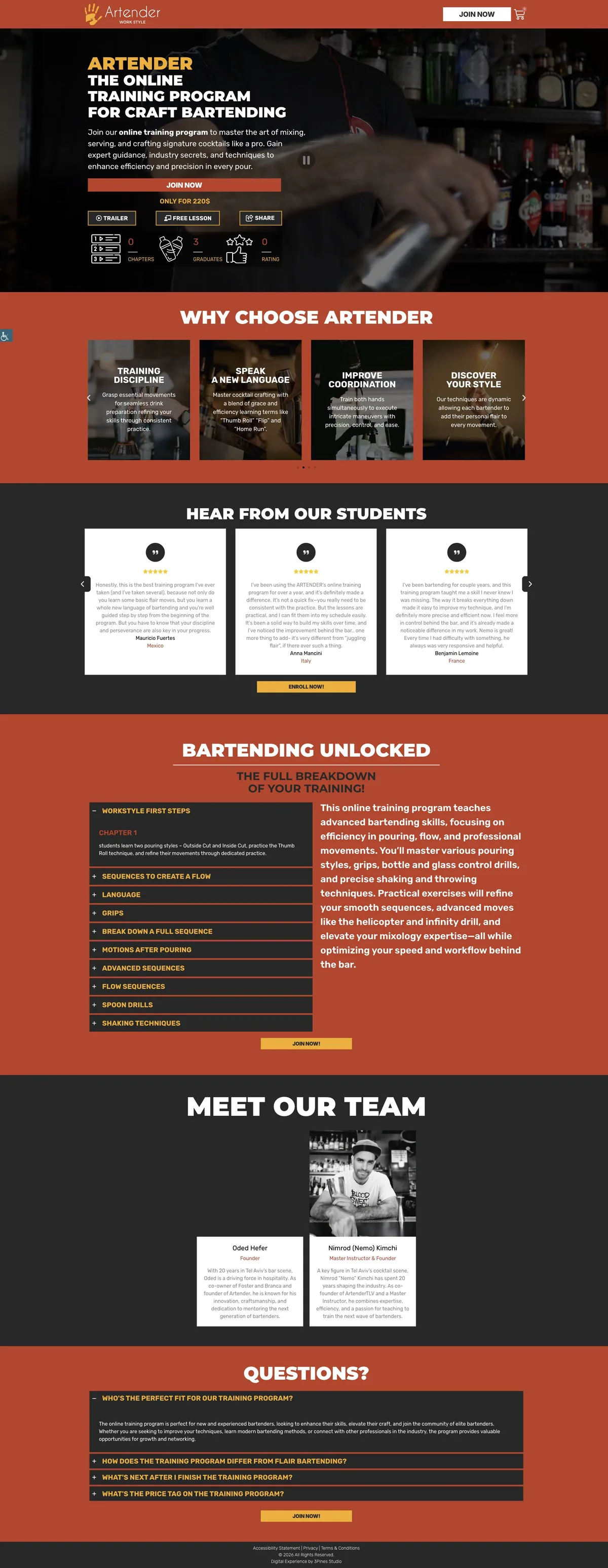
Artender

Online training program for bartenders

A sales page for an online course. The page presents the program, offers a preview with a trailer and a free lesson, lays out the chapters, and leads to enrollment. After purchase, students log in to access the course.

Good fit for: anyone who sells their expertise, when customers want to know what they’ll get before they sign up.

View the Artender project

What the store includes

From search
to checkout.

When I build an online store, I plan the whole buying journey, from search to order confirmation, around your catalog and the way you sell.

  1. Categories, search, and filters that match your catalog. A small catalog just needs clear organization. A large one needs a way for customers to narrow down their options.

  2. A product page with photos, details, the price, and options to choose from. Everything customers need to make a decision is in one place.

  3. Cart, payment, and shipping or pickup, depending on how your business sells. A few fields and clear steps, on mobile too.

    From a projectMuMu’s: payment and pickup in store.

  4. A confirmation for the customer, the order details for the business, and access to a digital product when that’s part of the project.

    From a projectArtender: students log in to the course.

Managing your store

A store you can
manage yourself.

I usually build stores on WordPress with WooCommerce, which lets you manage products and orders from a single dashboard. We finalize the platform and the integrations during discovery, based on what you sell and how your business works.

Day to day

What you’ll do yourself

  • Add products and update prices, photos, and descriptions.
  • Manage product options, such as size, color, or version.
  • See new orders and update their status.
At handoff

What you’ll get from me

  • A walkthrough on managing the store, using your own products.
  • Access to everything: site admin, domain, hosting, and connected accounts.
  • You own the site and its content outright.
Down the road

When you’ll need help

  • A change to the structure, a new feature, or an integration with another system.
  • System and plugin updates, backups, and troubleshooting, as part of a separate maintenance service.
Maintenance and support

Fulfillment stays with your business: packing, shipping or pickup, inventory, and customer service. The store keeps the orders and their details organized, and you handle them day to day.

Costs

How much does it cost to build an online store?

The cost of an online store depends on its scope, and a store with a handful of products is very different from a large catalog with variations and integrations. After the intro call, you’ll get a proposal that spells out the work and any related costs.

What shapes the scope of the build

  • Product types and variations
  • Content entry: who adds the products
  • How ready your photos and copy are
  • The design scope and the number of languages
  • System integrations, such as payments, shipping, or accounting

Which costs continue after launch

  • Domain and hosting
  • Licenses for plugins and services
  • Fees charged by payment processors and shipping providers
  • Maintenance, if you choose to add it

What I need to prepare a proposal

  • What you sell
  • The rough size of your catalog
  • Whether you have an existing site
  • Which systems your business already uses

You don’t need to show up with a finished brief. We’ll start with what you sell.

Let’s talk about your store

The process

How we’ll build
your store.

Elad Oren

Throughout the project, you work directly with the person who plans, designs, and builds your store. No middlemen.

Every week you get an update: what’s done, what’s waiting on your approval, and what’s next.

A bit about me and the studio
  1. Discovery: how you sell

    Building an ecommerce website starts with understanding your products, your customers, and how you handle orders. We define the product types, the payment and delivery methods, and the integrations you’ll need.

    Outcome: A defined scope, including the platform and integrations.

  2. Catalog structure and design

    We organize the categories, attributes, and variations, and I design the key pages: the home page, the catalog, the product page, and the cart. I test the design with real products, on mobile too.

    Outcome: An approved design for the store’s pages.

  3. Build and integrations

    I build the store, add the products we agreed on, and connect payment, shipping, and notifications as planned in discovery.

    Outcome: A working store in a test environment.

  4. Testing and walkthrough

    The tests are tailored to the project. They cover the order flow, the notifications to the customer and to the business, and payment or pickup where they apply. After testing, I walk you through the store and hand over access.

    Outcome: A store that’s ready to launch, with all access handed over to you.

What we prepare together before the build

  • Product dataNames, descriptions, and options
  • PhotosWhat you already have, or a plan for a product shoot
  • PricesFor every product and each of its options
  • Delivery optionsShipping, pickup, or digital access
  • Accounts to connectSuch as a payment processor or a shipping carrier

Not everything has to be ready by the first call. We’ll put a list together and go through it before the build starts.

Questions and answers

Questions
you may still have.

Sometimes. It depends on the platform the site is built on, its technical condition, and how you sell. I’ll review your current site and recommend whether to add a store to it or build a new site that includes the store.

Intro call

Let's talk about your store.

Tell me what you sell and whether you already have a website. A name and a phone number or email is enough. We'll cover the rest on a call.

A small studio. On purpose.

Leave your name and a phone number or email, and I'll get back to you. We'll go over the details on a call.

Contact details

A phone number or an email is enough. You don't need both.

How can I help? (optional, choose as many as you like)

I'll only use your details to get back to you. Privacy policy